
Strategy reuse and backtests
Research cells remain ordinary editable Rust. These helpers make existing strategy code and recorded results easier to reuse; they do not replace custom analysis or introduce a separate trading engine.
Start from the session panel
Section titled “Start from the session panel”Under Strategy code & backtests:
- Load research tools loads your strategy’s public library/components as
project::, its normal dependencies, and the backtest/research helpers together. It does not connect a data feed or run a strategy. - Add discovery cell lists completed project backtests and graph parameter IDs.
- Choose a baseline and candidate, then Add comparison cell.
- Refresh saved runs updates the selectors after an experiment without resetting variables.
- Add signal chart & heatmap creates an editable example for the selected run.
- Add isolated backtest cell uses the historical snapshots already loaded in the notebook.
The Add… cell buttons insert code without executing it. Load research tools compiles and initializes the runtime, but never runs your saved notebook cells. If the same project revision is already imported into a running session, it reuses that session without recompiling, resetting variables or marking outputs stale. New or changed imports reset session variables and mark prior outputs stale.
Already-loaded bars and their original date/time configuration are restored when tools are loaded. Editing the session’s date inputs does not relabel an existing snapshot; load data again to use a different window.
Compilation and caching
Section titled “Compilation and caching”The first import resolves the project’s dependencies, compiles AQE, Polars and the exported project modules, then links the notebook helpers and restores loaded snapshots. The session panel shows the preparation/compiler stage and elapsed time; Stop/reset cancels the operation. Compiled dependencies are cached per notebook across resets and app restarts. A notebook cold build is separate from the desktop or strategy executable build and can still take several minutes.
Notebook cells and imported dependencies use a fast-build development profile: optimization level 0, 256 code-generation units, incremental compilation, no debug symbols and no link-time optimization. Debug assertions, overflow checks and panic unwinding remain enabled. This prioritizes compile latency over execution speed; notebook timings are not release-mode strategy benchmarks. The overrides apply only to notebook compilation, not to live strategy builds, normal backtests or isolated experiment subprocesses.
After updating AQS, restart the notebook session to pick up compiler-setting changes. Cargo may rebuild dependencies once when the profile changes, then reuse that cache on subsequent loads. There is no need to delete the compilation cache.
Keep the same notebook and its compilation cache for repeated work. Use Refresh saved runs to update backtest selectors without compilation. After editing this project’s sources or manifest, click Load research tools again. After editing AQE or another external path dependency, use Stop/reset followed by Load research tools to force a fresh import check. Resetting clears variables, not the dependency cache; rerun custom setup cells afterward.
Reuse an alpha, indicator or pipe
Section titled “Reuse an alpha, indicator or pipe”For example, a Three Amigo project exporting an openingrange module can use its actual alpha implementation:
use project::openingrange::Openingrange;
let alpha: Openingrange = Openingrange::new(    45, "07:00".to_string(), 14, 2.0, 1.5, false,);let study: AqsBacktest = aqs_run_alpha(alpha, &research_snapshot).await?;let btc = study.bars("BTCUSD", "5m")?;let signals = study.signals("BTCUSD")?;aqs_chart(&btc).candles().signals(&signals)?.show()?;
Use your component’s actual module name and constructor. aqs_run_alpha performs an AQE historical replay with the alpha lifecycle and time-filtered history. It is a signal-only study, without an entry-submission pipe; it is not a strategy-return backtest. Alphas requiring custom lifecycle setup, additional timeframes, shared variables or execution state should be tested in a complete strategy instead.
Use explicit variable types at imported-code boundaries, as above. The Rust notebook’s incremental type analysis can require an annotation even when an ordinary Cargo build would infer the type. If a cell reports that a variable’s type cannot be determined, annotate it (for example let btc: DataFrame = ...;), then reload the session/setup if the diagnostic requests a reset.
An imported indicator can operate directly on data.bars(symbol)?. Imported insight pipes require a strategy context and the appropriate insight states. Register them in your custom AQE Strategy, then run that strategy:
// my_strategy implements AQE's existing Strategy interface.let run = aqs_run_strategy( my_strategy, &research_snapshot, 100_000.0, 10,).await?;aqs_table(&run.trades()?, 20)?;This custom replay uses PaperBroker defaults for fees and the explicit cash/leverage arguments. It does not inherit graph lifecycle registrations or the graph’s fee settings. Use a saved-graph experiment below when those should be retained. You can also define functions, indicators, models and strategies directly in Rust cells.
Read existing backtests
Section titled “Read existing backtests”aqs_table(&backtests.list()?, 100)?;let run = backtests.load("backtests/your-run-id")?;run.metrics()The list includes completed runs in the linked project’s backtests/ directory and completed research/experiments/ runs. Use the returned ID; raw absolute paths and parent-directory traversal are rejected. Metrics and backtest.db must both exist.
let equity = run.equity()?;let trades = run.trades()?;       // Closed round tripslet insights = run.insights()?;  // Full saved insight recordslet btc = run.bars("BTCUSD", "5m")?;let fills = run.table("trade_log")?;let monthly = run.table("monthly_returns")?;
aqs_table(&insights, 20)?;aqs_plot(&equity, "equity")?;
bars selects the exact saved symbol/timeframe and non-feature stream. It adds an Int64 UTC-millisecond timestamp column. equity adds that timestamp plus return_pct (equity change from the first observed equity) and drawdown_pct (relative to the running observed peak). These are not cash-flow-adjusted returns.
table(name) preserves stored column names and data. Available tables include bars, account history, insights, trade log, round trips, monthly returns, time performance, drawdown series, strategy/regime performance, factor exposure, correlations, position concentration, slippage, trade MAE, setup performance, rolling Sharpe, parameter sweeps and walk-forward results. Older runs may lack some tables and report an error rather than inventing data.
Full reads are bounded to 250,000 rows and 64 MiB per request. Exceeding the bound produces an error, not a silently truncated result. Paginate explicitly for larger runs:
let (page, has_more) = run.table_page("insights", 10_000, 0)?;// Next page: run.table_page("insights", 10_000, 10_000)?Compare strategies and signals
Section titled “Compare strategies and signals”let baseline = backtests.load("backtests/baseline-id")?;let candidate = backtests.load("backtests/candidate-id")?;
aqs_compare_backtests(&[&baseline, &candidate])?;aqs_returns_heatmap(&[&baseline, &candidate])?;let differences = aqs_compare_insights(&baseline, &candidate)?;aqs_table(&differences, 30)?;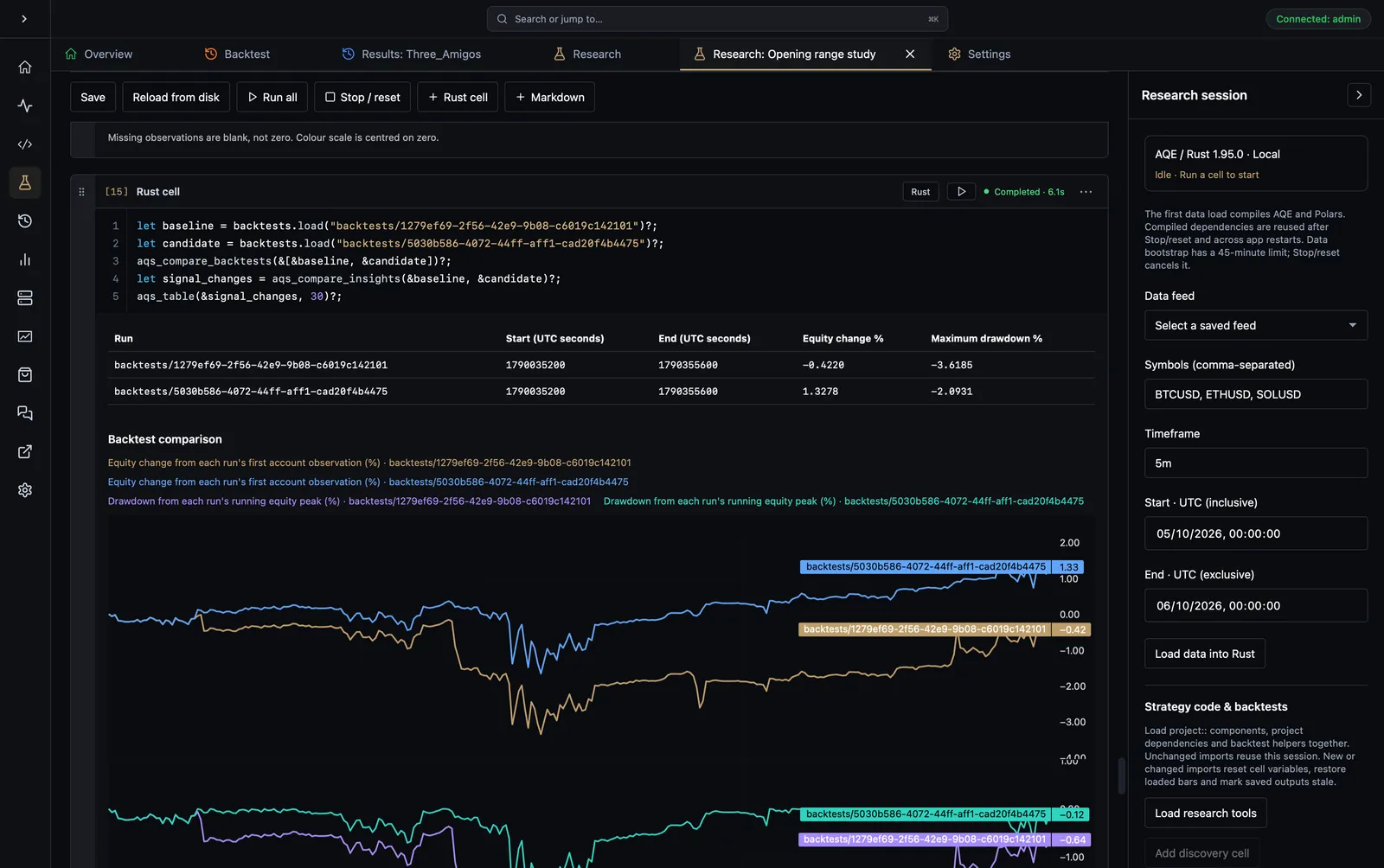
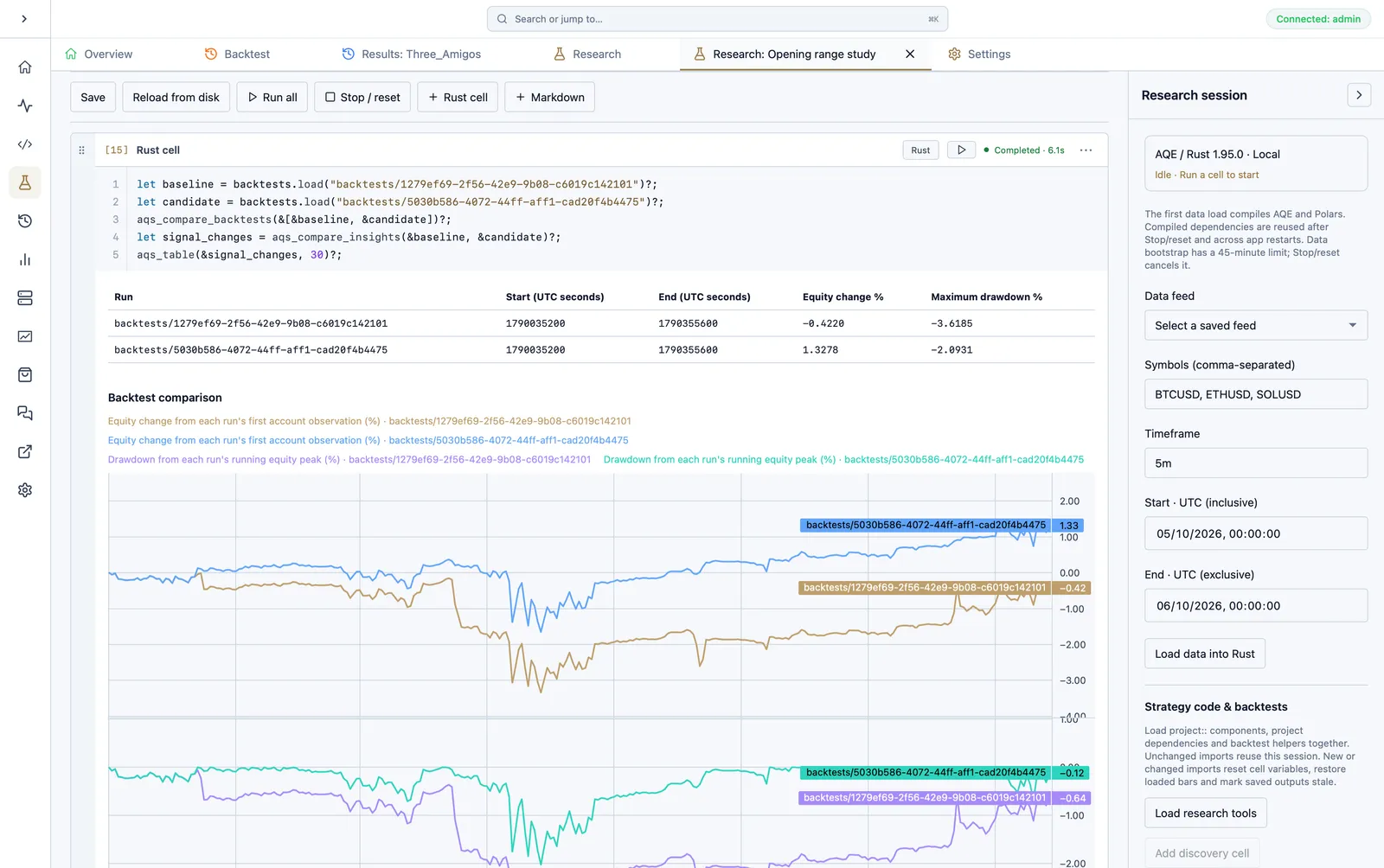
Compare saved runs with an account summary, equity-change curves and drawdown curves. View the full-size comparison screenshotView the full-size comparison screenshot.
aqs_compare_backtests accepts 2–6 runs and emits a summary plus equity-change and drawdown overlays. Statistics use every loaded account observation; curves are display sampled. Each run keeps its observed UTC times. There is no forward filling or rebasing to an invented common observation.
Check matching test windows, initial capital, cash flows, source revision, dataset, warm-up, asset specifications and fees before attributing differences to a model change. The helper displays different periods but does not claim they are controlled experiments. Recorded metrics remain available through metrics().
aqs_compare_insights matches generated signals by symbol, exact creation time, alpha, side, timeframe and parent/child status—not random insight UUIDs. Duplicate signals are counted. It returns baseline/candidate counts, matched counts and signals unique to each run. It does not assert identical fills or P&L; inspect the full insight and trade tables for those.
The older aqs_compare(&data, symbols, "close") compares market prices, not backtest performance.
Mark generated signals or executed entries
Section titled “Mark generated signals or executed entries”let candles = baseline.bars("BTCUSD", "5m")?;let generated = baseline.signals("BTCUSD")?;aqs_chart(&candles).candles().signals(&generated)?.show()?;
let executed = baseline.fills("BTCUSD")?;aqs_chart(&candles).candles().signals(&executed)?.show()?;Generated markers use created_at; executed-entry markers use filled_at. A generated signal is not proof of an order fill. Custom marker frames need timestamp (UTC milliseconds), side (Buy/Sell, case insensitive) and optionally label. Filter to one chart symbol yourself and at most 500 markers.
The interactive chart places a marker on the preceding displayed bar and keeps the exact event time in its text. Out-of-range markers are not displayed. Downsampling can change visual placement; it never changes the stored timestamp. AQI paper snapshots use the same interactive renderer for saved time-series charts and retain a static SVG fallback with event-time captions.
Run an isolated saved-graph experiment
Section titled “Run an isolated saved-graph experiment”Save the graph and load historical data, then inspect actual node IDs/input names:
project_parameterslet baseline = aqs_backtest() .name("Baseline") .snapshot(&research_snapshot) .run()?;
let candidate = aqs_backtest() .name("Candidate") .snapshot(&research_snapshot) .parameter("actual-node-id", "actual-input-name", 45) .run()?;
aqs_compare_backtests(&[&baseline, &candidate])?;The runner snapshots project sources and the saved graph, verifies the historical Parquet fingerprints, creates CSV input, and uses normal AQE code generation with PaperBroker. It retains graph sizing, risk, pipe ordering, lifecycle and fee configuration. Overrides apply only to this experiment; the original .aqmeta, source and manifest are not rewritten. Unsaved editor graph changes are not included. Resolve hyperparameter defaults first; implicit combinatorial sweeps are not launched.
Each experiment lives in research/experiments/<id>/, with its source/config snapshot, provenance.json, execution.log and ordinary AQE backtest artifacts. Builds reuse research/experiment-target/. Stop/reset terminates the notebook process tree, including an active experiment. Failed runs keep diagnostics and are not listed as completed.
External path dependencies still refer to their existing source directories; they are not copied into the experiment. Keep those dependencies stable while comparing runs. The project lockfile is used as a starting point, but Cargo may resolve changes required by the research build; inspect the experiment’s final Cargo.lock when reproducing results.
Data-model limits: CSV replay uses synthetic assets, not MT5 contract specifications. The loaded timeframe must exactly match the graph execution timeframe; no missing stream is substituted or forward-filled. A single loaded timeframe does not provide extra feature timeframes or pre-window warm-up history. Inspect coverage and logs for models needing those streams. These results are not automatically equivalent to broker-feed backtests or live execution. Projects with custom build scripts are not supported by the isolated graph runner yet.
Share a result
Section titled “Share a result”Selected code, comparison plots, marker charts, heatmaps and table previews can be included in an AQI notebook block. Readers do not execute anything. Sharing does not automatically upload project source trees, raw databases, datasets or credentials. Review any code, printed paths and data previews before saving or publishing a paper.
We use essential cookies and storage for sign-in, account security, colour theme preferences, this notice, and required PostHog internal usage, session quality, and reliability metrics. We do not use advertising cookies.